2018 Honda Odyssey Owner’s Manual — Display Audio
AUDIO AND CONNECTIVITY
Operation*
Use simple gestures-including touching, swiping, and scrolling-to operate certain audio functions.
Some items may be grayed out during driving to reduce the potential for distraction. You can select them when the vehicle is stopped or use voice commands*.
Wearing gloves may limit or prevent touchscreen response.
You can use a microfiber cleaning cloth to remove dust or fingerprints from the touchscreen.
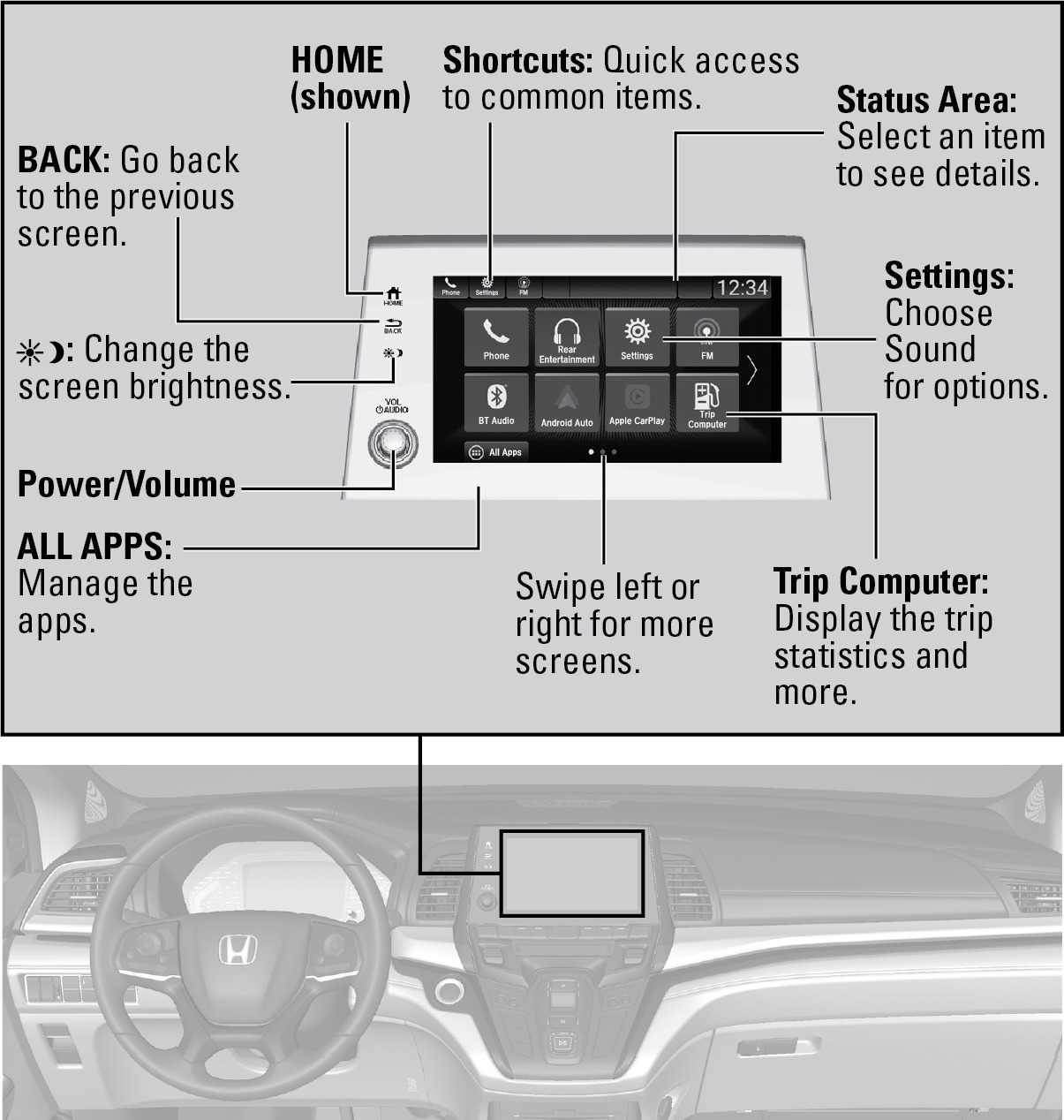
*if equipped
Setting Touchscreen Sensitivity
You can adjust the touchscreen's sensitivity to your fingertip.
- From the HOME screen, select Settings, then System.
- Select Touch Sensitivity.
- Make your selection.
Related topics:
- Managing Apps
- Basic Audio Operation
- Wallpaper Setup
- HondaLink
Stored owner’s manualImported HTML from the shared Autotk manuals tables. Not an official Toyota site.