2018 Honda Odyssey Owner’s Manual — Managing Apps
AUDIO AND CONNECTIVITY
Models with Display Audio
Customize the Home screens by adding, moving, and hiding apps. Use presets to keep frequently used apps at your fingertips.
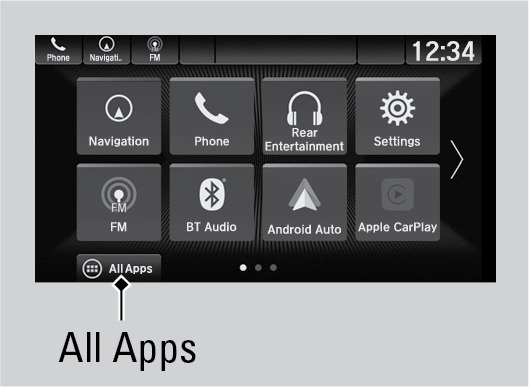
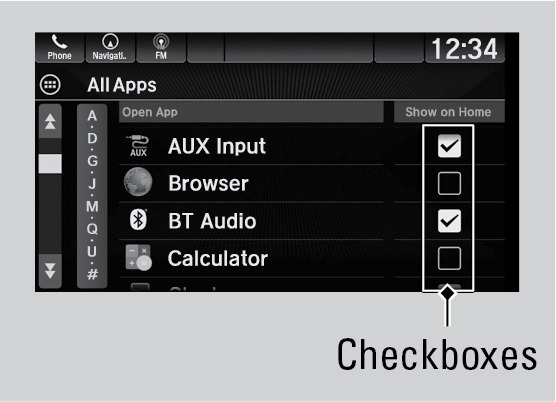
Add Apps to a Home screen
- On the Home screen, select All Apps.
- Check the box for an app you want to add.
Move Apps
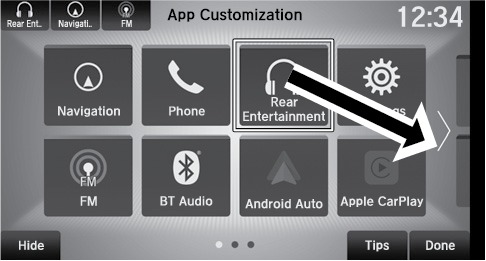
- On the Home screen, select and hold an icon.
- Drag and drop it where you would like it.
- Select Done
Hide Apps
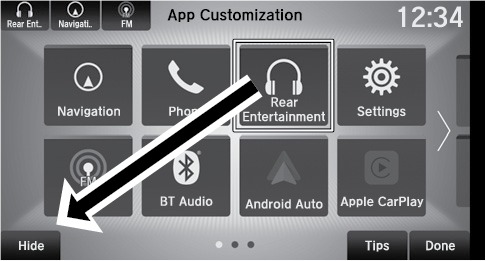
- On the Home screen, select and hold an icon.
- Drag and drop it on the Hide icon
- Select Done.
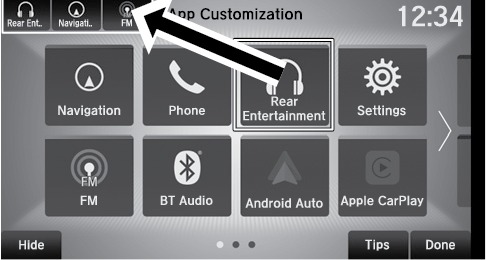
Set Shortcuts
- On the Home screen, select and hold an icon.
- Drag and drop it the upper-left corner of the screen.
- Select Done.
Do not install apps other than those confirmed by a Honda dealer. Unauthorized apps may have privacy and data corruption risks.
Related topics:
- Basic Audio Operation
- Color Audio Operation*
Stored owner’s manualImported HTML from the shared Autotk manuals tables. Not an official Toyota site.